
Introduction
You get error messages during the simulation with TOP-Energy and can’t get any further? This article describes the errors in more detail and suggests solutions.
If errors occur during the simulation, this can have various causes. The most important clue are the error messages and warnings shown in the Simulator message window and in the Simulation form under Metrics → Messages. In contrast to the component-related model messages, the Simulation messages refer to generic and syntactic problems.
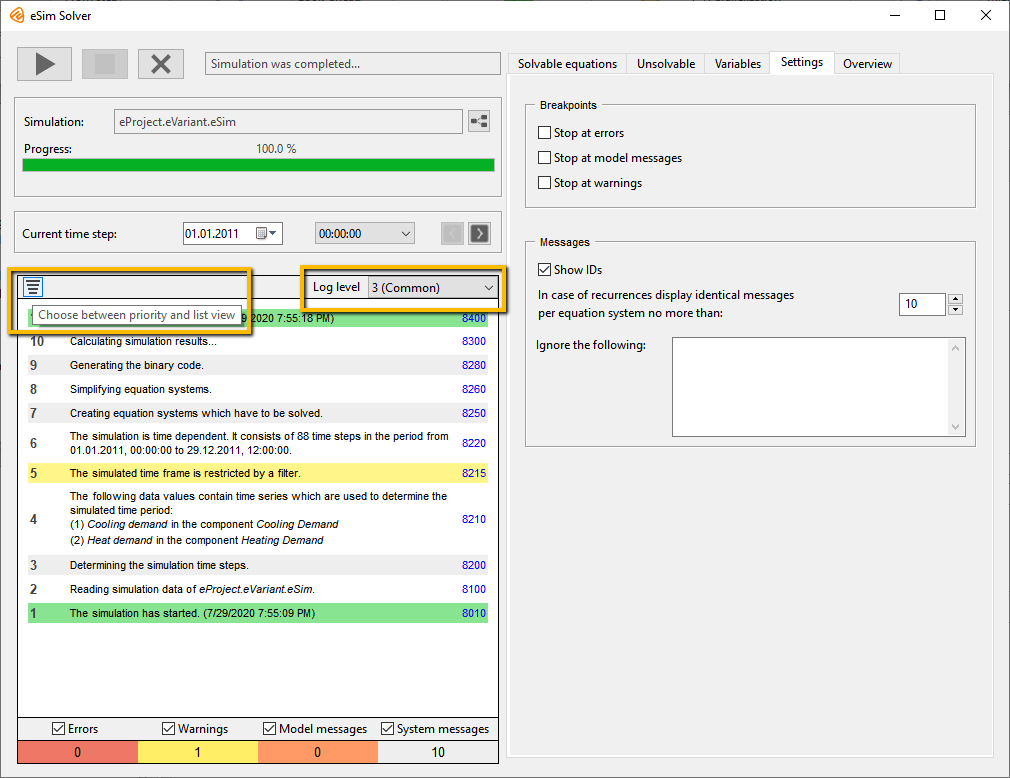
If there is a large number of error messages, activate the Priority view to get an overview (see following figure). On the other hand, if the information is not sufficient, you can increase the Log level to level 4 (debug).
General Messages

Message
The simulation has started.
Log level
Default (2)
Description
This message appears immediately after the simulation has started. The message contains a current time stamp.
Message
TOP-Energy …
Log level
Debugging (4)
Description
This message appears from log level 4 and indicates the version and release number of the TOP-Energy used.
Message
The CSV file containing the simulation results was saved.
Log level
Details (3)
Description
A CSV file with the simulation results was saved in the user directory. It contains averages, minima, and maxima for all primitives included in the simulation model.
This functionality can be enabled in the Simulation options menu (to be opened via Advanced settings on the Extras ribbon) under Save simulation results as CSV file.
Message
The message with ID … occured … times during the simulation.
Only the first … messages were displayed.
Log level
Default (2)
Description
This message appears if another message occurs very frequently. This can happen, for example, in a time-dependent simulation if a certain error occurs in each time step.
To keep the log window clear, the same error is not output unnecessarily often.
- How often one and the same message is output per equation system when solving can be defined in the Simulator window under the tab Settings → Messages → In case of recurrences display identical messages per equation system no more than: …
- Note the previous error messages with the ID shown. Often these have a common cause. Especially the very first error message is of importance.
- Check if you have selected a log level that is too high by mistake. Typically this should be set to 3 (common) or 4 (debug).
Message
The simulation was canceled by the user.
Log level
Default (2)
Description
This message appears when the user cancels the simulation.
Message
The simulation was completed.
Log level
Default (2)
Description
This message appears immediately after the end of the simulation. The message contains a current time stamp.
Message
TOP-Energy wishes you a Merry Christmas and a Happy New Year … .

Log level
Default (2)
The message appears a few days before Christmas.
Treatment:
- Do not forget to buy gifts and a Christmas tree in time.
- Only a few more weeks, then the new TOP-Energy will be released!
Reading Components and Material Models
The components are described in the modeling language PML which has a simple syntax. If this is not observed, an error occurs which generally leads to the termination of the simulation. For example, it may be a misspelled unit or a not declared variable used in an equation.
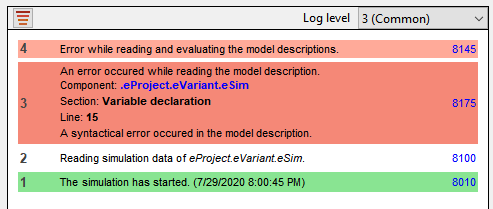
The error message displayed includes a link to the component, the model section, and the line number in which the error occurred.
Message
The selected simulation node is invalid.
Log level
Errors (1)
Message
Reading simulation data of …
Log level
Default (2)
Description
Subsequently, all data of the selected simulation, in particular all components and material models used, are read in.
Message
An undefined variable has been used in the model description.
Log level
Errors (1)
Description
An undeclared variable was used in the model equations.
Message
A variable with unexpected type was used. Variable: …
Log level
Errors (1)
Message
A function call is invalid. Please check the syntax of the function. Function: …
Log level
Errors (1)
Description
An invalid identifier was used in a function call.
Message
A variable is being registered which cannot be associated to any component. It is also not defined in a global context. Variable: …
Log level
Errors (1)
Message
Internal error: …
Log level
All messages (5)
Message
You are using a variable with invalid return type. Variable: …
Log level
Errors (1)
Message
A variable in the declaration was given the type … This type is not valid in the model description.
Log level
Errors (1)
Message
An error occured while reading the variable … The unit … of the variable is not valid.
Log level
Errors (1)
Description
You have tried to declare a variable whose unit is unknown in Top-Energy.
The unit may not be registered in Top-Energy. This may be the case in particular when units are untypical of industrial energy systems, such as Becquerel [Bq].
Message
An error occured while reading the variable … The associated unit … is not valid.
Log level
Errors (1)
Description
You have tried to declare a number with an unknown unit.
The unit may not be registered in Top-Energy. This may be the case in particular when units are untypical of industrial energy systems, such as Becquerel [Bq].
Message
Reading simulation data of … .
Log level
Debugging (4)
Description
This message is displayed immediately before the component is read.
Message
The variable … is repeatedly declared.
Log level
Default (2)
Description
The declared variables must have a unique name within a component.
Message
(…-)variables cannot be multiplied/divided.
Left hand side: … Right hand side: …
Log level
Errors (1)
Description
Variables of certain types such as DateTime, Duration, Container, or Text cannot be multiplied or divided.
Message
… is a structural optimization component.
Log level
Debugging (4)
Description
As soon as there is a structural optimization component in the model, all time steps are coupled with each other in the optimization.
Thus, a large optimization problem is calculated for all time steps, while a small optimization problem is solved for each time step in the operation optimization.
Please use structural optimization components only if you really want to optimize the size of plants and not the operation of the energy system.
Message
Two expressions are multiplied which were declared as linear.
Expression 1: … Expression 2: …
Log level
Errors (1)
Description
Linear variables must not be multiplied with each other.
Message
An expression is divided by a linear variable.
Divident: … Divisor: …
Log level
Errors (1)
Description
In a division, a linear symbol appears in the divisor.
Message
Linear expressions must not be potentiated.
Expression 1: … Expression 2: …
Log level
Errors (1)
Description
An attempt was made to potentiate a linear variable. Linear expressions must not be potentiated.
Message
Linear expressions cannot be used in … expressions.
Expression: …
Log level
Errors (1)
Description
An attempt was made to use a linear variable in a logical expression, an if-else expression, or a case expression.
Message
Reading components and pins.
Log level
Debugging (4)
Description
In the following, the data of the components and their structural links in the scheme are read.
Message
An exponent has unit … Exponents with units cannot be processed.
Log level
Errors (1)
Description
An exponent with a unit was used in an equation. This is not possible because the expression does not have a valid unit.
Message
The base has a unit … In this case, the processing of non-integer exponents is not possible.
Log level
Errors (1)
Description
In a potency, the base has a unit and the exponent is variable or a non-integer constant. This is not possible because the expression does not have a valid unit.
Message
… variables cannot be potentiated. The call is: … ^ …
Log level
Errors (1)
Description
Variables of certain types such as DateTime, Duration, Container, or Text cannot be potentiated.
Message
The scheme contains more than one Electricity_Tariff_CHP_Surcharge component. Note that these components must apply to separate energy circuits. A balanced component (electric grid and/or electricity demand) must not occur in more than one Electricity_Tariff_CHP_Surcharge component.
Log level
Default (2)
Message
An error occured while converting two operands in a comparison. Left hand side: … Right hand side: . . .
Log level
Errors (1)
Description
In a relation, the units or variable types on both sides are incompatible.
Message
The right hand value in the assignment to … is not convertible into the desired unit. Right hand side: …
Log level
Errors (1)
Description
In an assignment, the unit of the expression on the right side cannot be converted to the unit of the variable on the left side.
Message
The unit of the right hand side cannot be converted into the unit of the left hand side in an equation. Left hand side: … Unit of left hand side: … Right hand side: … Unit of right hand side: …
Log level
Errors (1)
Description
In an equation, the units on both sides are incompatible.
Message
Expressions cannot be converted into each other in an equation of the linear optimization. Equation: …
Log level
Errors (1)
Description
In an equation, the units on both sides are incompatible.
Message
The following expressions cannot be processed in an addition. Left hand side: … Right hand side: …
Log level
Errors (1)
Description
The summands of an addition cannot be calculated because their variable types or units are incompatible.
Message
The following expressions cannot be processed in a subtraction. Left hand side: … Right hand side: …
Log level
Errors (1)
Description
The operands of a subtraction cannot be calculated because their variable types or units are incompatible.
Message
The condition of an if-statement is not convertible into a boolean expression. Condition: …
Log level
Errors (1)
Description
An invalid condition was specified in a section-wise equation.
Message
Option, Text, and DateTime variables must not be used in subtractions. Expression: …
Log level
Errors (1)
Description
Variables of certain types like DateTime, Option, or Text cannot be subtracted.
Message
Parts of an …-expression are not convertible into a boolean expression. Left hand side: … Right hand side: …
Log level
Errors (1)
Description
Invalid operands were specified in a logical operation.
Message
Reading and evaluating the model descriptions.
Log level
Debugging (4)
Description
Subsequently, the model descriptions contained in the various components are read and transferred to an internal format. Here the syntax is checked for correctness.
You can read more about the model description language PML here.
Message
Error while reading and evaluating the model descriptions.
Log level
Errors (1)
Description
An error occurred when reading the model descriptions. Please note previous error messages.
Message
The block structure of the …-statement is wrong.
Log level
Errors (1)
Description
The block structure of a userInput, userOutput, or case statement was not adhered to.
Message
Expression contains an unknown modifier.
Log level
Errors (1)
Message
You are using an invalid reference. Please check the selection in the form of the component.
Log level
Errors (1)
Message
An assignment refers to the unknown variable … Right hand side: …
Log level
Errors (1)
Description
The variable on the left side of an assignment is not declared.
Message
You are using an identifier in a state declaration which does not correspond to any pin. Identifier: …
Log level
Errors (1)
Description
The identifier of a state variable could not be assigned to a pin in the corresponding component.
Message
Internal error: invalid return type in an assignment.
Log level
Errors (1)
Message
Internal error: The expression type of the function … could not be found in the symbol table.
Log level
Errors (1)
Message
Internal error: Unregistered expression type.
Log level
Errors (1)
Message
The function … can only be used as statement.
Log level
Errors (1)
Description
A function was used in an expression but must be called as an instruction
function name(Arg1, Arg2, …);
Message
The function … does not contain the required number of arguments.
Log level
Errors (1)
Description
Too many or too few arguments were used in a function call.
Message
The argument no. … of the function … does not have the required type or unit. Argument: …
Log level
Errors (1)
Description
An argument used in a function call has the wrong type or unit.
Message
The variable … has the same name as a PML-function/subcomponent.
Log level
Errors (1)
Message
A generate … statement contains an unknown variable. Variable: …
Log level
Errors (1)
Description
In a function for creating a balance equation, a state variable was passed that cannot be assigned.
Message
generate … was called without a valid pin. The given pin is: …
Log level
Errors (1)
Description
Functions for creating balance equations such as generatePinSum, generatePinEquality, generateOutPinEquality, or generateIntensivePropertyBalance can only be used in material models.
Message
A generate … statement was used in a net containing bidirectional pins.
Log level
Errors (1)
Description
A function for creating a balance equation was used in a network with bidirectional pins, but requires directional pins to be evaluated.
Message
A Correspondence/setProportion statement is invalid.
Log level
Errors (1)
Description
Incompatible units or variable types were used in a Correspondence or setProportion statement.
Message
Absolute units are used in the section … of the component … Please use only the relative unit [K] for temperatures in the model.
Log level
Default (2)
Description
No absolute units such as [′degC] or [′K] may appear in a multiplication or division.
Message
An equation of the linear optimization does not have a linear structure. Maybe a linear variable in the equation was accidentally not declared as “Linear Number”. Equation: …
Log level
Errors (1)
Description
Either no linear variables were found in a linear equation or inequation or the equation has the wrong structure.
Message
The initial value … cannot be used.
Log level
Errors (1)
Description
An error occurred when reading a start value in a variable declaration.
Message
An initial value cannot be used for the variable …
Log level
Errors (1)
Description
An initial value could not be set because the variable has the wrong type.
Message
The range … cannot be used.
Log level
Errors (1)
Description
An error occurred when reading a range of values in a variable declaration.
Message
A range cannot be used for the variable …
Log level
Errors (1)
Description
A value range could not be set because the variable has the wrong type.
Message
A syntactical error occured in the model description.
Log level
Errors (1)
Description
A syntax error has occurred in the PML that cannot be identified more precisely.
Component, model section, and line in which the error occurred are displayed.

Message
The section … of the component … contains invalid end if statements. Please use exactly one end if for each if condition.
Log level
Default (2)
Description
Several end if were used in a piecewise equation or assignment.
Message
The function calculateRatio is called on the variable … of the component … This function will not be supported in future releases. Please use the time series function weightedMean instead.
Log level
Default (2)
Description
In one model the function calculateRatio was used which will no longer be supported in future versions of TOP-Energy.
Message
Some units are missing in section … of the component … Please insert a compatible unit in square brackets in the declaration when connecting a Number to a primitive.
Log level
Default (2)
Description
In the declaration a Number variable was linked with a primitive. However, no compatible unit was specified.
Message
Reading and evaluating the material model components.
Log level
Debugging (4)
Description
Subsequently, the model descriptions contained in the material models are read and transferred to an internal format.
You can read more about the integration of material models here.
Message
A case-statement cannot be evaluated, since the variable … in the condition contains a time series.
Log level
Debugging (4)
Description
The warning appears if a time series is used in the valuation of a case condition.
Message
Error while reading and evaluating material models.
Log level
Errors (1)
Description
An error occurred when reading the material models. Please note previous error messages.
Message
The simulation model contains one or more components to be structurally optimized. The calculation of the net present value and the annualized total cost is based on the economic observation period of … years. All simulation time steps are considered simultaneously in the structural optimization.
Log level
Default (2)
Description
As soon as there is a structural optimization component in the model, all time steps are coupled with each other in the optimization.
Thus, a large optimization problem is calculated for all time steps, while a small optimization problem is solved for each time step in the operation optimization.
Please use structural optimization only if you really want to optimize the size of plants and not only the operation of the energy system.
Reading the Structure and Validating the Input Data
After the PML has been read, the data are transferred to an internal structure. Checks are carried out again, e.g., whether the linked contents (time series, characteristic curves …) are consistent with the variable types.
Message
Generating structure equations.
Log level
Debugging (4)
Description
Subsequently, the material models are copied to the corresponding pins, and state variables for the pins are generated.
You can read more about the integration of material models here.
Message
Error while generating the structure equations.
Log level
Errors (1)
Description
An error occurred when generating the structure equations for material models. Please note previous error messages.
Message
During the structural analysis, a pin was found that is not connected to any component. It is assumed that no mass and energy flows are transported across the pin. Name of the pin: …
Log level
Errors (1)
Description
The warning occurs if a component has different connection options for a material model. As a rule, some connections then remain free.
It is assumed in the simulation that no material flows are transported via the free pins.
A typical example is the selection via different output pins in the Fuel_Tariff_Natural_Gas_Germany of whether the fuel supplied should be taxed or not.
Message
A connection between the pins … and … is not possible, since they transport different materials.
Log level
Errors (1)
Message
The pin … contains a … declaration. This is not compatible with the pin type.
Log level
Errors (1)
Message
A primitive does not exist. Please check the model description. Path of the attribute: …
Log level
Errors (1)
Description
In the declaration, a variable was linked to a primitive whose path is invalid.
Message
The PinNumbers … and … have different units … and … , even though the corresponding pins are connected by a net. The simulation may run faster if equal units are used.
Log level
Debugging (4)
Message
At least one pin is not connected to the net. Pin: …
Log level
Errors (1)
Description
A pin on a component has not yet been connected to a material model. But the connection is absolutely necessary for the simulation.
Message
It is not possible to connect the primitive … to the …-variable … of the component … because the primitive has a different type or does not exist.
Log level
Errors (1)
Description
In the declaration, a variable was linked to a primitive that has an invalid path or type.
Message
A reference to a component property model could not be established in a pin variable. Please check the model description if you forgot the state declaration. Name of the variable: …
Log level
Errors (1)
Description
A serious error has occurred.
Message
A unit cannot be generated from the primitive … because the primitive has the wrong type or does not exist.
Log level
Errors (1)
Message
Connecting a primitive to a variable is not possible. Path of the primitive: …
Log level
Errors (1)
Description
An attempt has been made to associate a variable with a primitive for which this is not possible.
Message
Connecting a primitive to a pin is not possible. Path of the primitive: …
Log level
Errors (1)
Message
A primitive is already connected to a variable. A second connection will not be established. Path of the primitive: …
Log level
Default (2)
Description
An attempt was made to connect a variable with a primitive that is already connected with another variable.
Message
It was tried to assign a value to an option primitive in the model description.
Log level
Errors (1)
Message
Error while reading the primitive … in the component …
Log level
Errors (1)
Description
An error occurred when reading a primitive.
Message
The variable … of the component … has a modifier and has not numeric type. Modifiers are only allowed for numeric types.
Log level
Errors (1)
Description
An attempt has been made to set a modifier (Linear/Steady) to the variable … of the component … that does not have a number type.
Modifiers such as Linear or Steady are used to declare linear variables and are only allowed for variables of type Binary, Integer, or Number.
Message
The … variable … of the component … has an invalid modifier. Only … are allowed.
Log level
Errors (1)
Description
The binary/integer variable has an invalid modifier. Only Linear and Steady are allowed.
Message
Input error of the variable … in the component … : The input value is not defined. The cause is an invalid link, e.g., to the ETA or to the master data.
Log level
Errors (1)
Description
The input value is linked to a deleted master data set or a deleted time series and therefore undefined.
Message
The function … is used more than once on the characteristic … . This is not allowed.
Log level
Errors (1)
Message
The characteristic … is used in a function, but contains no values.
Log level
Errors (1)
Description
An attempt has been made to evaluate a characteristic curve which contains no values or only one value.
Message
An invalid interpolation type was used for the characteristic … Please use Linear, Step, or Spline.
Log level
Errors (1)
Description
The second argument in the getYFromX function, which is optional and describes the type of interpolation, should take one of the values Linear, Step, or Spline. Linear is used by default.
Message
The characteristic … consists of more than 5 entries (supporting points). To avoid longer run times, please reduce the number of supporting points.
Log level
Default (2)
Message
Internal error: …
Log level
All messages (5)
Message
Connecting the primitive … to the number… of the component… is not possible because their units are incompatible.
Log level
Errors (1)
Description
In the declaration, the unit of the linked primitive is not compatible with the variable unit.
Message
Connecting the primitive … to the number … of the component … is not possible because their ranges are incompatible.
Log level
Errors (1)
Description
The value range of a variable specified in the declaration does not overlap with the value range of the linked primitive.
Message
The target expression … is not registered. The term … is assigned to other costs.
Log level
Default (2)
Description
An unknown target function contribution was used. This is assigned to other costs.
Message
The control component … is taken into account only when optimizing operating costs. The settings within the component are ignored, and the operation of the energy system is optimized.
Log level
Default (2)
Description
The simulation model contains a Priority component. However, the operational optimization is not optimized according to operational costs.
Message
The control component … is used with a time frame for optimizing operations. This can lead to wrong results.
Log level
Default (2)
Description
The simulation model contains a Priority. At the same time, a Look-ahead (time frame) is used in operational optimization.
Structure of the Systems of Equations to Be Solved
When large underdetermined systems of equations occur, usually input data have been forgotten. When searching for such forgotten inputs, you should check the Output variables with identifiers under the Unsolvable tab in the Simulator window. Although the simulation is carried out, all output variables are not calculated in underdetermined systems of equations. As a rule, such an incomplete result is useless.
Message
[Pre-stage] Because the number of time points to be compressed is very low, no compression is performed.
or:
[Pre-stage] The compression level for structural optimization / year-round coupling is set to no compression/exact.
With this setting, the entire simulation period is coupled and calculated for structural optimization and operational optimization in just one step. The Look-ahead is set to the length of the entire simulation period.
Log level
Details (3)
Description
No preliminary stage is necessary. Only the main stage takes place.
Message
An equation is redundant and thus not considered when solving the equation system. The equation is: …
Log level
Debugging (4)
Description
A redundancy check is performed before block decomposition, and redundant equations are removed from the model.
In general, these are superfluous mass flow balances in closed circuits.
Message
Creating equation systems which have to be solved.
Log level
Details (3)
Description
Subsequently, a calculation sequence for the various variables is determined. In particular, it results which variables can be calculated from the input data.
This is done by a block decomposition in which the equations are grouped into small systems of equations (blocks). You can read more about this here.
Message
Unsolvable (underconstrained) equation systems have been found in the decomposition. Please check the components for missing input data.
Log level
Default (2)
Description
Underdetermined systems of equations have arisen during block decomposition. These cannot be solved.
This can have various causes, such as missing input data or errors in the model.
Message
An overconstrained block of dimension … (variables/equations) has been found in the decomposition.
Log level
Default (2)
Description
The block decomposition resulted in an overdetermined system of equations.
A solution is sought in which all equations are fulfilled in the best possible way.
Message
An underconstrained block of dimension … (variables/equations) has been found in the decomposition.
Log level
Debugging (4)
Description
The block decomposition has resulted in an underdetermined system of equations, which cannot be solved.
This can have various causes, such as missing input data or errors in the model.
Message
An underconstrained assignment has been found in the decomposition.
Log level
Debugging (4)
Description
The block decomposition resulted in an underdetermined allocation. This cannot be resolved.
This can have various causes, such as missing input data or errors in the model.
Message
The linear equation system is unsolvable. Underconstrained coefficients have been found in the decomposition.
Log level
Default (2)
Description
The block decomposition resulted in underdetermined coefficients in the linear optimization problem.
The optimization problem is only processed if all coefficients of the equations, inequalities, and target function are calculated.
Message
An error occured in the block decomposition. An invalid variable was found.
Log level
Errors (1)
Message
The primitive … from the input data of the component … occurs in an underconstrained block. Please check if you accidentally forgot to input data.
Log level
Default (2)
Description
An underdetermined equation system contains non-existent input data from the form of a component.
Message
The primitive … from the output data of the component … occurs in an overconstrained block. Please check if you really want to use the given user input in the output data.
Log level
Default (2)
Description
An overdetermined equation system contains an entry in the output data in the form of a component.
Message
The variable … of the component … is extracted from the linear variable … by a correspondence.
Log level
All messages (5)
Description
The message appears when a result from the linear optimization problem is transferred to the corresponding non-linear variable.
Time Dependency
A typical error are not overlapping periods of the time series. In this case, the simulation period is empty and the simulation is not performed. However, the problem can easily be solved by editing the corresponding time series.
Message
Determining the simulation time steps.
Log level
Details (3)
Description
This section checks whether input data are available in the form of time series.
In a time-dependent simulation, the simulation period corresponds to the average of the periods of all input time series.
Message
An error occured while evaluating the time series in the simulation.
Log level
Errors (1)
Description
An error occurred while reading the time-dependent input data. Please note the previous error messages.
Message
The following data values contain time series which are used to determine the simulated time period: . . .
Log level
Default (2)
Description
All time-dependent input data are listed.
In this way it is possible to find time series stored in the project which influence the simulation period.
Message
The simulated time frame is restricted by a filter.
Log level
Default (2)
Description
The simulation period can be restricted by a filter to a smaller section or a coarser time grid.
The corresponding settings can be found in the filter group of the simulation ribbon.
Message
The simulation is time dependent. It consists of … time steps in the period …
Log level
Default (2)
Description
The message appears if the simulation is time-dependent. The simulation period displayed is helpful for navigating between the individual time steps in the user interface.
Message
The input time series … from the component … contains … empty data points within the simulated time period. No results will be calculated for these time steps.
Log level
Errors (1)
Description
The error occurs if input time series contain empty data points within the period to be simulated. At the corresponding times, all simulation results that depend on such a time series cannot be calculated.
Message
The input time series … from the component … contains … data points which violate the lower/upper bound.
Log level
Default (2)
Message
[Pre-stage] The year-round coupled optimization was aborted because one or more input time series are abstract. Please convert the time series into equidistant concrete time series.
Log level
Errors (1)
Solution:
Convert the time series into equally spaced concrete time series.
Message
The time zones of the input time series do not coincide. The time zone … is used for the time dependent simulation results.
Log level
Default (2)
Description
The message appears if the time zones of the input time series differ. The time zone of the time series that was read first is then used for the simulation results.
Message
The variables of the simulation system are not defined for a common time period.
Log level
Errors (1)
Description
The error occurs if the periods of the input time series do not overlap.
Message
The time steps of the input time series do not coincide. Altogether … data points were ignored and … data points were complemented.
Log level
Default (2)
Description
The warning occurs if the times of the input time series are not identical. The simulation is carried out for the time period in which all time series overlap.
Data points of input time series outside this overlapping period are ignored, and data points missing within this overlapping period are completed by interpolation of the data.
Message
All time steps have been removed by the chosen filter.
Log level
Errors (1)
Description
After applying the filter for the simulation period, no points in time remained to be simulated.
Preparation for Solving the Equations
In order to accelerate the subsequent calculation of the results, the previously created systems of equations are symbolically simplified and generated as binary code.
Message
Simplifying equation systems.
Log level
Details (3)
Description
In the following, the equations from the model descriptions are symbolically simplified.
This makes it possible to calculate the result variables more accurately and faster.
Message
The simulation requires at least … GB available memory.
Log level
Default (2)
Description
At this point it is estimated how much memory the simulation requires. This is particularly important for large simulation models with extensive time series.
Message
Generating the binary code.</em
Log level
Details (3)
Description
For the equations to be solved, C code is generated and executed, which is stored in the user directory in a temp folder as “simalgo*.cpp”.
The character * in the file name is replaced by a unique ID. After the simulation the created files will be deleted.
Message
Compiler call of the binary code: …
Log level
All messages (5)
Description
The message shows the exact call to compile the binary code that describes the equations to be solved.
Message
Linker call of the binary code: …
Log level
All messages (5)
Description
The message shows the exact call to link the binary code that describes the equations to be solved.
Message
An internal error occured while loading the DLL of the simulation system.
Log level
Errors (1)
Message
Unloading the model library failed.
Log level
Default (2)
Message
Error while generating the binary code.
Log level
Errors (1)
Description
The binary code is generated and executed in a temp folder of the user directory. An error occurred.
Message
[Pre-stage] There is a cycle relationship for a year-round coupled constraint …, but the simulation period is not one year. This can lead to undesirable results.
oder
[Pre-stage] Cycle relationships are available for several year-round coupled constraints …, but the simulation period is not one year. This can lead to undesirable results.
Log level
Default (2)
Message
The algorithm for the year-round coupled optimization uses its own parameters.
Log level
Default (2)
Message
Due to the year-round coupled optimization, the calculation uses a Look-ahead of … and a result time frame of …
Log level
Details (3)
Message
You are using non-equidistant time series in the year-round coupled simulation. This has an unfavorable effect on the numerics. If possible, do not use a filter with a grid in the Simulation ribbon, and convert all input time series into equidistant synchronous time series in advance in the ETA.
Log level
Default (2)
Message
At least 50 time steps must be stored for the compression of the year-round coupled pre-stage. Because less than 50 time steps are stored, the compression level ‘No compression/exact’ is used.
Log level
Details (3)
Message
An error occured when processing the initialization section. The input variable … does not have a valid value.
Log level
Errors (1)
Message
The solver used in the current strategy was not found. Please check if the correct strategy was chosen.
Log level
Errors (1)
Message
You are using a fixed seed for time series compression. You can change the seed in settings and try if this produces better results.
Log level
Default (2)
Message
An integral variable has no initial value. This was set to 0.
or
Several integral variables (…) have no initial value. 0 was set for these.
Log level
Debugging (4)
Message
[Pre-stage] A cycle relationship between the start and end of the simulation period was established for an integral variable (…).
or
[Pre-stage] Cycle relationships between the start and end of the simulation period were established for several integral variables (…).
Log level
Debugging (4)
Message
Based on your settings, the pre-stage for structural optimization is not recalculated.
Log level
Default (2)
Calculation of Results
Errors may occur during the calculation of individual blocks, possibly only in a few time steps. Because the systems of equations depend on the results of blocks already calculated, the cause of the error may lie in a previous block. Therefore the navigation over already calculated variables under the tab solvable equations is useful. Some typical errors are listed below:
- A system of equations does not converge. The error occurs exclusively in systems that are solved numerically.
- The solution of a system of equations violates an operational limit. In many generating plants, a PML message is generated stating which operating limit was exceeded in which component.
- A partial load characteristic curve cannot be evaluated for a point. This often occurs as a consequence of exceeded operating limits.
- A value range is violated. This happens occasionally when calculating states with systems switched off.
Message
Calculating simulation results …
Log level
Default (2)
Description
The message appears when the simulator starts solving the equation systems.
Depending on the size of the simulation model and the number of time steps, this may take some time.
Message
The value … could not be loaded, because its unit is not convertible into the expected unit.
Log level
Errors (1)
Message
The value … could not be loaded. It has an invalid data status.
Log level
Errors (1)
Message
Internal error: …
Log level
All messages (5)
Message
A value could not be written back into a primitive: …
Log level
Default (2)
Description
An error occurred when writing the result of a variable back into the linked primitive.
Message
A value different from zero and one has been calculated for a binary variable. The value is set to True. Variable: … Calculated value: …
Log level
Default (2)
Description
A value was calculated for a binary variable that is neither zero nor one.
Message
A non-integer value has been calculated for an integer variable. The value is rounded to the next integer. Variable: … Calculated value: …
Log level
Default (2)
Description
A value was calculated for an integer variable that is not an integer.
Message
An invalid value has been calculated for the variable …
Log level
Errors (1)
Description
An error occurred while calculating the variable.
Possibly it was divided by zero, or a root with negative radicant was calculated.
Message
A calculated variable already has a calculated value. The previous value is kept. Variable: … Previous value: … Newly calculated value: …
Log level
Default (2)
Description
The message appears when a variable that has already been calculated is calculated in the above equation system.
Message
The equation system is unsolvable. This error is often caused by functions with restricted range.
Log level
Default (2)
Description
A system of equations could not be solved numerically due to an erroneous iteration.
Message
The overconstrained equation system does not have a unique solution. This may indicate redundant equations or a nonphysical solution.
Log level
Default (2)
Description
The overdetermined equation system just calculated has several solutions. It is unclear which of the solutions makes physical sense.
Message
An error defined in the model occured.
or
A model specific error/warning has occured in component … :
Log level
Errors (1)
Description
Such a message is generated by the model in the simulation. You should pay attention to the content!
Message
The overconstrained equation system did not converge. Either it is unsolvable or the initial values are badly chosen.
Log level
Errors (1)
Description
The just calculated (overdetermined) partial equation system could not be solved.
Message
A solution has been found which violates at least one of the equations. The following equation of the system is not satisfied (error: …): …
Log level
Errors (1)
Description
In a numerically solved system of equations only a solution was found which does not fulfill all equations of the system.
Message
A solution has been found which violates at least one of the equations. Because the equation system is overconstrained the solution is nonetheless kept. Please check the input data for inconsistencies. The following equation is not satisfied (error: …): …
Log level
Default (2)
Description
In an overdetermined system of equations only a solution was found which does not fulfill all equations of the system.
Warning:
The solution of the equation system is not unique. This may indicate redundant equations or a nonphysical solution.
Log level
Debugging (4)
Description
The system of equations has several solutions. When solving with the Newton method, it is unclear whether the solution determined makes physical sense.
Error:
The characteristic … cannot be evaluated for the value … The function getXFromY/getYFromX returns an error. The component … is operated outside the valid scope.
Log level
Errors (1)
Description
An attempt was made to evaluate a characteristic curve outside its definition range.
Message
The characteristic … is not unique for the value …
Log level
Default (2)
Description
The evaluation of a characteristic curve is not unambiguous. The characteristic … is for the X-value/Y-value … not unique.
Message
eSim_createParamList: An unsupported parameter type was used.
Log level
Errors (1)
Message
A value outside the valid range has been calculated for a variable. Variable: … Calculated value: … Bound of the range: …
Log level
Default (2)
Description
The specified value range was violated for a calculated variable.
Message
The property model function … could not be evaluated.
Log level
Errors (1)
Message
The property model function … did not converge after 50 iterations. The last valid value is used for …
Log level
Errors (1)
Description
For the calculation of material values (e.g., steam states, caloric air and exhaust gas values), material value polynomials according to the IAPS formulation of 1984 (Kestin and Sengers 1986, DOI: 10.1063/1.555772) are used. These are determined by numerical iteration. If the values are particularly unfavorable, no solution is found.
Message
The property model function … did not converge after 50 iterations. The operating point seems to be invalid.
Log level
Errors (1)
Description
The state point seems to be invalid.
Message
Error while calculating the property model: …
Log level
Errors (1)
Message
The value … was assigned to the primitive … . Because the value is close to zero, it is set to 0.0.
Log level
All messages (5)
Description
This message appears if a very small value (< 1e-08) was calculated for a result variable that is linked to a primitive.
Such small values are usually caused by numerical inaccuracies. The variable is assigned the value zero.
Message
The exponential function cannot be evaluated with argument … The result is too big.
Log level
Errors (1)
Description
An attempt was made to evaluate the exponential function with an argument that is too large.
Typically, the argument used is wrong.
Message
The logarithm (base 10/base e) cannot be evaluated with argument …
Log level
Errors (1)
Description
An attempt was made to evaluate the logarithm function with a negative argument.
Typically, the argument used is wrong.
Message
A negative root occured in block …
Log level
Debugging (4)
Description
An attempt was made to evaluate the root function with a negative argument.
Typically, the argument used is wrong.
Message
Function could not be evaluated.
Log level
Default (2)
Message
A zero division occured in block …
Log level
Debugging (4)
Description
When calculating a variable, division by zero was performed.
Message
The LU-decomposition of the Jacobian contains a singular matrix.
Log level
All messages (5)
Description
During the LU decomposition of the Jacobian matrix a singular matrix was found.
Message
Matrix and vector cannot be multiplied because the dimensions do not match.
Log level
Errors (1)
Message
The function … was called for the variable … of the component … which has not numeric type.
Log level
Errors (1)
Description
A function was called for a not real-valued variable.
Message
The equation system … seems to have multiple solutions. The redundancy check yields a second solution. Results of the variables: …
Log level
Debugging (4)
Description
The system of equations has several solutions. It is unclear which of the solutions makes physical sense.
Message
The log data of Newton’s method has been saved as …
Log level
Details (3)
Description
An error occurred when solving a system of equations using the Newton method.
Message
The equation system could not be solved yet. The solution search is continued with the partially simplified equations.
Log level
Default (2)
Description
The message appears if Advanced solution search is activated when solving an equation system numerically.
In this case, after a few iterations, a partially simplified system is used for calculation.
Message
The csv-file containing the simulation results was saved.
Log level
Details (3)
Description
A CSV file containing the simulation results has been saved in the user directory. It contains averages, minima, and maxima for all primitives included in the simulation model.
This functionality can be activated in the Simulation Options Menu under Extras → Advanced Settings → Simulation → General settings → Output simulation results as CSV file.
Message
Cannot plug in key … into the option …
Log level
Errors (1)
Message
No time series are used.
Log level
Default (2)
Description
A date or time variable is used although it is not time-dependent.
Message
The variable … does not have a valid value. A period of a year is assumed for calculation of the integral. The simulation must be time dependent. Please insert at least one time series in the input data.
Log level
Debugging (4)
Description
An integral function was used although there is no valid simulation period.
Linear Optimization
If components in the energy system are wrongly dimensioned or if operational side conditions cannot be fulfilled, it happens that the linear optimization problem cannot be solved in individual time steps.
Message
You are using the linear optimizer … with version … and release …
Log level
Debugging (4)
Description
Here you can see which MILP solver is used for the linear optimization problem.
Message
Solve info: The calculation ended with status … .
Log level
All messages (5)
Message
Solve info: The error … occured. Further information: …
Log level
All messages (5)
Message
The linear optimization problem was solved with target value … [EUR/a].
Log level
Debugging (4)
Description
Here you can see the target function value of the linear problem. The unit used depends on the target function selected in the simulation ribbon.
Message
The linear problem is not solved because some coefficients are missing due to zero divisions which happened earlier.
Log level
Errors (1)
Message
The linear problem was saved as LP-file.
or
The linear problem was saved as MPS-file.
Log level
Details (3)
Description
An LP or MPS file with the linear problem was saved in the user directory (e.g., Gurobi.lp by default under C:/Users/$Username$/AppData/Roaming/TOP-Energy/EnergyFrames$Version$/eSim).
If the link cannot be opened directly from the error message, open the LP file from the named folder in an editor of your choice, permanently linking LP files to the desired editor so that they are automatically opened in the editor in the future.
This functionality can be activated in the Simulation options menu under Advanced settings (Extras ribbon) → Simulation → Linear optimization → Save linear problem as file.
Message
The CSV-file containing the results of the linear problem was saved.
Log level
Details (3)
Description
A CSV file with the results of the linear problem was saved in the user directory (by default as LpResults.csv under C:/Users/$Username$/AppData/Roaming/TOP-Energy/EnergyFrames$Version$/eSim).
This functionality can be activated in the Simulation options menu under Advanced settings (Extras ribbon) → Simulation → Linear optimization → Save lp-results as CSV file.
Message
The linear optimization problem is temporally coupled… . time steps are considered simultaneously.
Log level
Details (3)
Description
Here you can see how many time steps are considered simultaneously in the linear optimization problem.
A temporal coupling always occurs when performing a structural optimization or when using a look-ahead time frame in optimization.
Message
The linear optimization problem did not result in an optimum.
Log level
Errors (1)
Description and Solution
The linear optimization problem has no valid solution.
Message
An error occured while solving the linear optimization problem.
Log level
Errors (1)
Message
The irreducible inconsistent subsystem was saved as ILP file.
Log level
Debugging (4)
Description
A file with the minimally inconsistent subproblem was saved in the user directory (by default under C:/Users/$Username$/AppData/Roaming/TOP-Energy/EnergyFrames$Version$/eSim) after the solution space of the linear optimization problem was empty.
This functionality is only available when Gurobi is used as a solver.
If the link cannot be opened directly from the error message, open the ILP file from the named folder in an editor of your choice, permanently linking ILP files to the desired editor so that they are automatically opened in the editor in the future.
Message
The coefficients of the equation … differ in the magnitude of 10^… Big-M values have negative impacts on the numerical properties of the linear optimization problem.
Log level
All messages (5)
Message
Validation: The … in the component exceeds the maximal value … by more than …
Log level
Default (2)
Description
Immediately before thecalculation of the linear optimization problem, a validity check is performed.
Here it is checked whether in principle the demands for heat, cold, electricity, and steam can be covered by the existing generation capacities. The exact interconnection of the systems is not taken into account.
Message
Validation: The … exceeds the … in the energy system by more than …
Log level
Default (2)
Description
Immediately before the linear optimization problem, a validity check is performed.
Here it is checked whether in principle the demands for heat, cold, electricity, and steam can be covered by the existing generation capacities. The exact interconnection of the systems is not taken into account.
Message
Solve info: — Runtime: … min — Current gap value: … % —
Log level
Debugging (4)
Description
The message informs about the gap value of the current solution every minute in case of major optimization problems.
The percentage gap value is calculated as follows \(\frac{y^*-y_B}{max(|y^*|, |y_B|)}\). Here \(y^*\) denotes the target function value of the best solution found to date. Furthermore, \(y_B\) is the best lower bound for the target function value of each solution. The following always applies \(y^*\geq y_B\).
In the course of the optimization process (Branch and Bound), the solutions and bounds are gradually improved so that the gap value tends towards zero. The procedure stops as soon as the gap value reaches a certain limit. By default this is 0.1 %, but this value can be adjusted in the Simulation ribbon in the groups Operational optimization and Structural optimization. The higher the limit, the less time the process takes to solve.
Message
Solve info: — The time limit was exceeded. — The currently best solution is used. — Current gap value: …
Log level
Default (2)
Description
When the time limit is reached, the optimization is aborted and the currently best solution is used.
The time limit for the termination can be adjusted in the Simulation ribbon in the groups Operational optimization and Structural optimization. It is one minute for operational optimization and ten minutes for structural optimization as standard.
Message
Solve info: — “GurobiParameters.prm” was read.
Log level
Debugging (4)
Message
The linear optimization problem is quite large due to the temporal coupling. … time steps are considered simultaneously.
Log level
Default (2)
Description
Here you can see how many time steps are considered simultaneously in the linear optimization problem. The time coupling should be as small as possible so that the optimization problem can be solved within a reasonable time.
A temporal coupling always occurs when performing a structural optimization or when using a look-ahead time frame in optimization.
Message
The linear optimization problem is too large. Please reduce the number of time steps or use a different MILP solver.
Log level
Errors (1)
Description
The linear optimization problem is too large due to the time step coupling. A temporal coupling always occurs when performing a structural optimization or when using a look-ahead time frame in optimization.
Message
[Pre-stage] No solution could be found for the year-round coupled pre-stage. The time limit may have been exceeded.
Log level
Errors (1)
Message
[Pre-stage] The year-round coupled pre-stage was carried out successfully.
Log level
Details (3)
Message
[Pre-stage] The value for the downsampling rate was set too high and the number of simulation steps too low to carry out a simulation for the year-round coupled pre-stage. The simulation is aborted.
Log level
Errors (1)
Message
The time step coupling … in the component … is not taken into account in the simplified pre-stage in the linear model. Set the compression level to no compression/exact to take it fully into account.
Log level
Details (3)
Message
The structural optimization results were stored. The following values were calculated: …
Log level
Details (3)
Description
After each structural optimization, the results of the structure variables are displayed here. These are transferred to the form of the Simulation node.
Message
A valid Gurobi license was not found.
Log level
Errors (1)
Description
The message occurs if the solver Gurobi cannot be initialized for the linear optimization problem due to a missing license.
Message
The linear optimization variable … does not correspond to the solution of the algebraic equation system … in the component … The deviation is: … Please check the model for errors (e.g., series connection).
Log level
Errors (1)
Description
Check the model for errors (e.g., series connection).
Message
The time step coupling … in the component … cannot completely be incorporated in the linear model. The time frame is too small.
Log level
Default (2)
Description
The time frame used in the simulation is too small for a control component used in the model.
Message
The structural optimization results could not completely be loaded. Please update the eSim node and restart the simulation.
Log level
Errors (1)
Description
An error occurred while loading the structural optimization results for the operational optimization.
Message
The pre-stage has failed.
Log level
Errors (1)
Message
[Pre-stage] The time series have been compressed for structural optimization to … time steps.
or
[Pre-stage] The time series have been compressed for structural optimization to … type days with … time steps each.
Log level
Details (3)
Description
The time series are automatically compressed according to the set time seris compression level before structural optimization to reduce the number of coupled time steps in the linear optimization problem.
Message
The input time series cannot be compressed for structural optimization.
Log level
Errors (1)
Description
The input time series are compressed for structural optimization using a clustering method. In order to use this procedure, the time axes of all input time series must match. This may not be the case if errors occurred in the simulation prior to optimization.
Message
[Pre-stage] The csv-file containing the compressed time series was saved.
Log level
Details (3)
Description
The compressed time series for structural optimization can be saved as CSV files in the user directory.
This functionality can be enabled with the function Save compressed time series as CSV file in the Simulation options menu (to be opened via Advanced settings on the Extras ribbon).
Message
The log file of the solver has been saved.
Log level
Details (3)
Message
[Pre-stage] The … with the time series … has been saved.
Log level
Details (3)
Message
[Pre-stage] Only a simple structural optimization is carried out because, in addition to selecting the multi-criteria structural optimization, you have activated the year-round coupled optimization for at least one component.
Log level
Default (2)
Message
[Main stage] The optimization of the main stage has been successfully completed.
Log level
Details (3)
Message
[Main stage] The main stage, which is carried out after the year-round coupled optimization (pre-stage), could not be carried out successfully because not all points in time could be solved.
Log level
Errors (1)
Message
Two variables that are connected through a linear identity are part of the same function.
Log level
Errors (1)

