
Settings of Structural Optimization
Make settings for structural optimization of the simulation node selected in the Project explorer in the Simulation form under Settings → Structural optimization → Parameters. These settings are saved in the project.
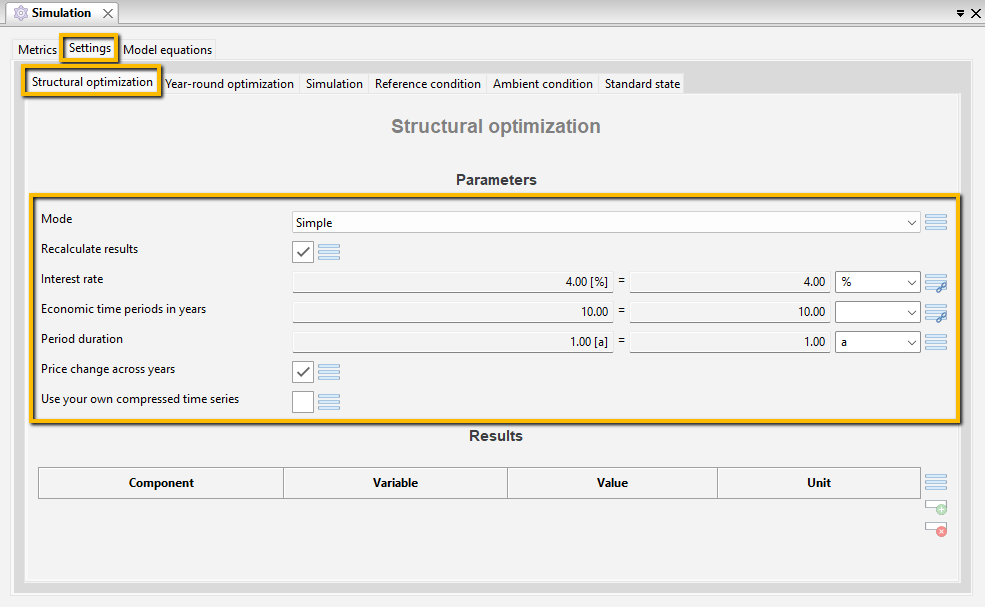
Select with the Mode whether the optimization is Simple (single-criteria) or Multi-criteria. For a multi-criteria structural optimization, select a solution from the Results displayed at the bottom of this form after the structural optimization. For the following simulations, specify whether the results are to be recalculated.
Set the economic constraints Interest rate and Economic time periods in years. They are linked to the Project master data by default. The Period duration is fixed at one year and cannot be changed.
The Price change across years is activated by default. In structural optimization, this function also takes into account the changed costs that arise over periods longer than one year, although otherwise only the time series of one year are used for the calculation in structural optimization. The Price change across years takes into account factors such as Inflation rates, expiring payments (e.g., in the Electricity_Tariff_CHP_Surcharge) and Reinvestment costs. The variable costs are taken into account in the optimal design of the energy system by discounting the value of the prices or reinvestment costs to the Start year using the Interest rate stored in the same form. If you only want to carry out the structural optimization using the data from the Start year, without taking into account the price changes beyond this, deactivate the function by clicking in the box. The check mark then disappears.
If you Use your own compressed time series, click in the box provided. The setting for Time series compression in the Simulation ribbon is then ignored and no compression is performed.
The other general parameters for structural optimization are specified in the Structural optimization group in the Simulation ribbon.

